Kubernetes Project: Create Multiple Pods
K8S Deployment | Flask Applications | Model Inference
This project demonstrates Kubernetes deployment strategies for multiple applications which include Deployments and Services at scale. It covers deployment of recruitment ranking application and Flask applications with multiple versions, implementing rolling updates, service exposure, and accessing machine learning models through web applications using tunnel methods.
Project Summary
Comprehensive Project Overview
Project Category
Multi-POD K8S deployment on Minikube.
Environment
Multi-POD K8S deployment on Minikube.
Applications
Flask Apps & ML Model Inference
Key Technologies & Concepts
Core Technologies Used
Kubernetes Keywords
Objectives & Use Case
Project Goals and Implementation
Primary Objectives
- Create multiple pods using Kubernetes Deployments
- Implement multi-version application deployment (v1 & v2)
- Configure services for internal and external access
- Implement rolling update strategy for zero-downtime deployments
- Access machine learning model through Flask application
- Monitor and manage application versions with rollout history
Use Case
- Deploy recruitment ranking application with 2 replicas
- Deploy Flask application versions v1 and v2
- Expose applications via ClusterIP and LoadBalancer services
- Access ML model inference through web interface
- Implement version rollback capabilities
Solution & Architecture
Architectural Overview
Solution Overview
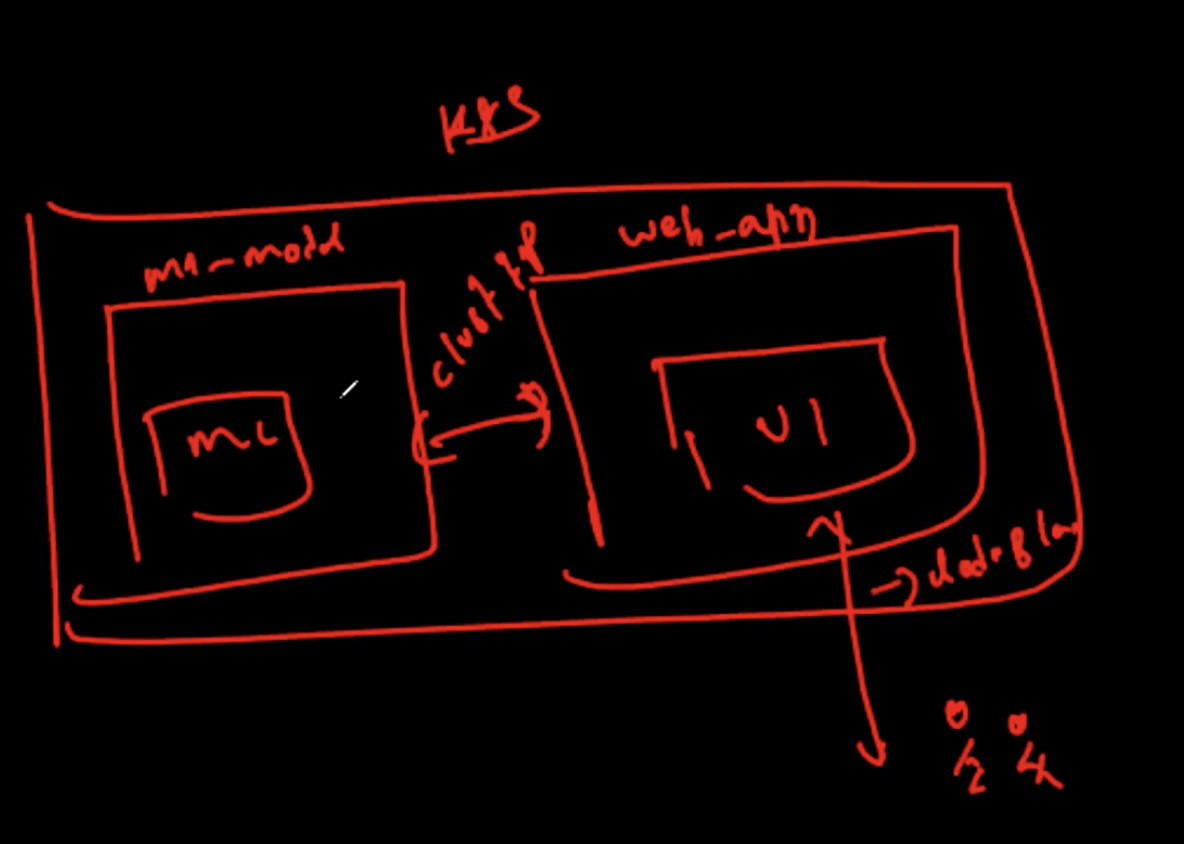
The project implements a Kubernetes-based deployment architecture with multiple applications running in pods. Two main applications are deployed:
1. Recruitment Rank App - Machine learning model for recruitment ranking with resource limits (CPU: 500m, Memory: 128Mi)
2. Flask App - Web application with multiple versions (v1 and v2) for ML model access
Services are configured for internal communication (ClusterIP) and external access (LoadBalancer). The architecture supports rolling updates with zero downtime and provides rollback capabilities.
Key Components
- Deployments: recruitment-rank-app, flask-app (v1 & v2)
- Services: ClusterIP for internal, LoadBalancer for external access
- Pods: Multiple replicas for high availability
- ReplicaSets: Automatic pod management and scaling
- Rolling Update Strategy: 25% max unavailable, 25% max surge
Deployment Configuration
YAML Configurations and Commands
Deployment YAML
kind: Deployment
metadata:
name: recruitment-rank-app
spec:
replicas: 2
selector:
matchLabels:
app: recruitment-rank-app
template:
metadata:
labels:
app: recruitment-rank-app
spec:
containers:
- name: placement-app
image: rajesharigala/placementapp:v1-arm64
resources:
limits:
memory: "128Mi"
cpu: "500m"
ports:
- containerPort: 9696
Service YAML
kind: Service
metadata:
name: recruitment-rank-app
spec:
type: ClusterIP
selector:
app: recruitment-rank-app
ports:
- protocol: "TCP"
port: 80
targetPort: 9696
Deployment Commands
Commands used to create and manage deployments:
Deployment Results:
Flask Application Deployment
Web Application with ML Model Access
Flask App Configuration
kind: Deployment
metadata:
name: flask-app
annotations:
kubernetes.io/change-cause: "Version 1 deployment of Flask app"
spec:
replicas: 2
selector:
matchLabels:
app: flask-app
template:
metadata:
labels:
app: flask-app
spec:
containers:
- name: flask-app
image: rajesharigala/placement-app-flask-ui:v1-arm64
ports:
- containerPort: 5000
env:
- name: PORT
value: "5000" # Flask's default port
Flask App Service (LoadBalancer):
kind: Service
metadata:
name: flask-app-service
spec:
type: LoadBalancer # Use ClusterIP if only internal access is needed
selector:
app: flask-app
ports:
- protocol: TCP
port: 5000 # Flask app's container port
targetPort: 5000 # Container listening on port 5000
Deployment Results
Rolling Updates & Version Management
Implementing Zero-Downtime Deployments
Rolling Update Strategy
Kubernetes implements rolling updates by default when updating a deployment. The strategy:
- Old pods are replaced one by one
- New pods are created before old pods are terminated
- One old pod at a time is replaced
- Strategy configuration: 25% max unavailable, 25% max surge
Strategy: Rolling Update strategy ensures zero downtime during application updates.
Version 2 Update
Updating to Flask App Version 2:
# Version 2 Deployment
metadata:
name: flask-app
annotations:
kubernetes.io/change-cause: "Version 2 deployment of Flask app"
spec:
containers:
- name: flask-app
image: 03asarath/placement-flask-app:v2
Rollout History & Rollback
View rollout history and manage versions:
Access ML Model through Flask App
Tunnel Method to access the application:
The service provides access to the Model Inference Dashboard where users can input:
- Port Number
- Gender
- SSC Percentage & Board
- HSC Percentage, Board & Stream
Starting tunnel for service flask-app-service. Opening service default/flask-app-service in default browser...
URL: http://192.168.49.2:31404
Skills & Technologies Used
Technical Proficiency Demonstrated
Primary Skills
- Kubernetes Deployment Configuration with YAML
- Multi-Pod Architecture Design and Implementation
- Service Configuration (ClusterIP, LoadBalancer)
- Rolling Update Strategy Implementation
- Application Version Management
- kubectl Command Line Proficiency
Secondary Tools / Platforms
- Minikube for Local Development
- Docker Container Images
- Flask Web Framework
- Machine Learning Model Integration
Programming & Configuration
Assets & References
Code, diagrams, study material
Kubernetes YAML Files
Complete set of YAML configuration files for deployments, services, and updates.
View Files