Kubernetes Single-Container ML Inference
Minikube Deployment with Service Tunneling
Deploying a single-container machine-learning inference service on Kubernetes using Minikube with service tunneling for local access. This project demonstrates production-like Kubernetes networking, service abstraction, and operational behavior for ML model serving.
Project Summary
Comprehensive Project Overview
Project Category
Kubernetes · MLOps · DevOps (Primary: Kubernetes Infrastructure & Deployment)
Industry/Domain
Information Technology (AI/ML Infrastructure & Platform Engineering)
Domain Focus
Machine Learning Inference Deployment on Kubernetes
Key Technologies & Concepts
Core Technologies Used
Kubernetes ML Inference Keywords
Problem & Objective
What problem did this project solve?
Problems Solved
- Running ML inference service reliably in local development with Kubernetes
- Cloud-managed load balancers unavailable in local environment
- Pods are ephemeral - direct container port access not stable
- Need for production-like Kubernetes networking in development
Primary Objectives
- Deploy containerized ML inference application as single-container Pod
- Expose application using Kubernetes Service (LoadBalancer type)
- Access externally through Minikube service tunneling
- Ensure stable, production-like network access in local environment
Solution & Architecture
Architectural Overview
Solution Overview
The solution deploys a containerized ML inference application as a single-container Pod managed by a Kubernetes Deployment on a local Minikube cluster. The application is exposed using a Kubernetes Service (LoadBalancer type) and accessed externally through Minikube service tunneling.
Entire setup is defined using declarative Kubernetes YAML manifests, ensuring reproducibility, scalability readiness, and alignment with real-world Kubernetes infrastructure patterns.
This approach provides stable, production-like network access while running locally, with the ability to seamlessly transition to cloud environments.
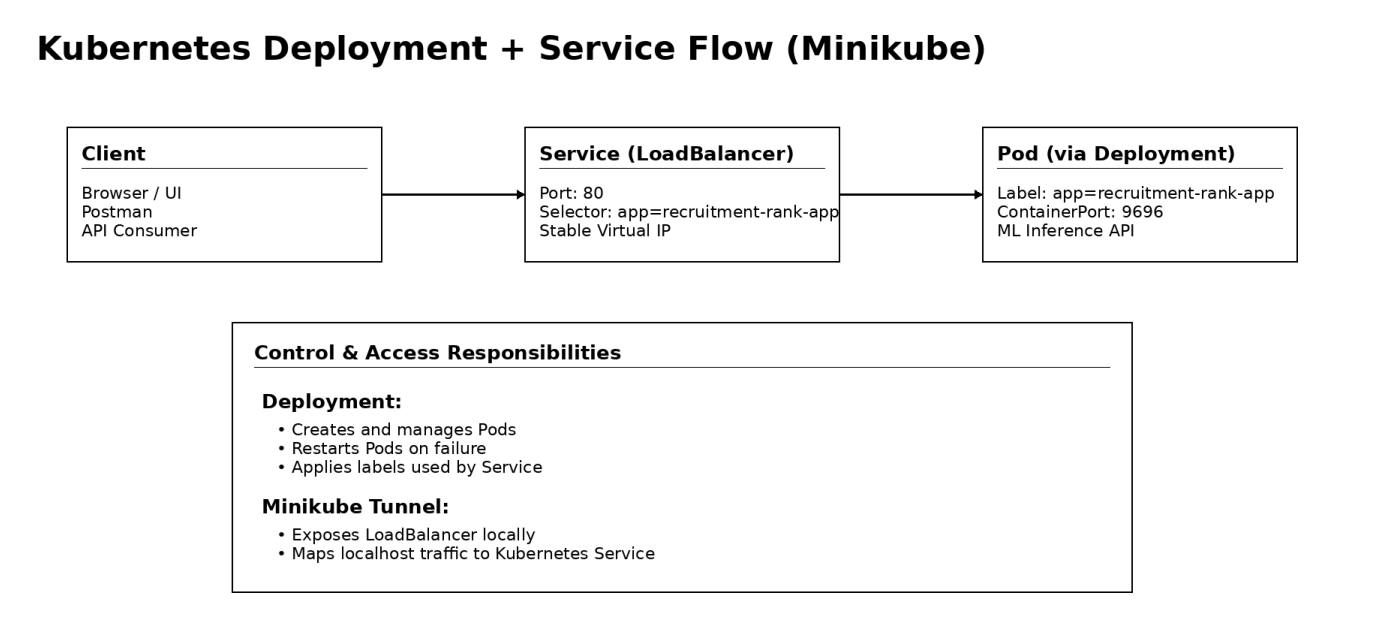
Key Components
- Kubernetes (Local Cluster via Minikube)
- Minikube (Single-node Kubernetes runtime)
- Docker (Container image runtime)
- Kubernetes Deployment (Pod lifecycle management)
- Kubernetes Service - LoadBalancer (Application exposure)
- Minikube Service Tunneling (Local external access)
- Kubectl CLI (Cluster and resource management)
- Containerized ML Inference Application (REST API)
Scalability & Reliability: Although implemented as single-replica deployment, the solution uses Kubernetes Deployment enabling horizontal scaling by increasing replica count. Kubernetes ensures self-healing by automatically restarting failed Pods. Resource limits (CPU and memory) prevent container overuse.
AI/DevOps Details
MLOps Implementation & Automation
AI/ML Focus
DevOps & MLOps Infrastructure for Machine Learning Inference Deployment
- Primary focus on Kubernetes-based deployment, networking, and operationalization
- Emphasis on ML inference service rather than model training
- Production-style model serving architecture
Automation & Orchestration
- Pre-trained ML model containerized as REST-based API
- Kubernetes-native operational workflows
- Declarative Deployment and Service manifests
- Automated Pod creation, lifecycle management, self-healing
- Service discovery and load balancing
Tools & Technologies
- Docker (Containerization of ML inference application)
- Kubernetes (Container orchestration and workload management)
- Minikube (Local Kubernetes cluster for development)
- Kubectl (CLI for deploying and managing resources)
- Docker Hub (Container image registry for image retrieval)
Monitoring & Optimization
- Basic monitoring using kubectl commands (get pods, describe pod, logs)
- Resource optimization via CPU and memory limits in Deployment
- Foundation for production monitoring (Prometheus, Grafana)
- Runtime visibility through container logs
Skills & Technologies Used
Technical Proficiency Demonstrated
Primary Skills
- Kubernetes Deployment & Services — Intermediate
- Container Orchestration (Pods, ReplicaSets, Networking) — Intermediate
- Docker Containerization — Intermediate
- Minikube (Local Kubernetes Operations) — Intermediate
- Kubectl CLI & Resource Management — Intermediate
- Infrastructure as Code (Kubernetes YAML) — Intermediate
Secondary Tools / Frameworks
- Python (REST-based ML inference API)
- Flask (Lightweight web framework for model serving)
- Docker Hub (Container image registry)
- Postman (API testing and validation)
- Linux / macOS Terminal (CLI-based operations)
Programming Languages
- Infrastructure as Code YAML configuration
- Python (ML inference API development)
- CLI commands (Minikube, Kubectl, GitHub)
Cloud & DevOps Tools
Kubernetes YAML Manifests
Declarative Infrastructure as Code
Deployment Manifest
# API version for Deployments
apiVersion: apps/v1
kind: Deployment
metadata:
name: recruitment-rank-app
spec:
selector:
matchLabels:
app: recruitment-rank-app
template:
metadata:
labels:
app: recruitment-rank-app
spec:
containers:
- name: placement-app
image: rajesharigala/no-ui-placement-ml-model:v1-arm64
resources:
limits:
memory: "128Mi"
cpu: "500m"
ports:
- containerPort: 9696
Key Notes: This Deployment creates and manages Pods automatically. No replicas specified → defaults to 1. Labels connect Deployment ↔ Pods ↔ Service. Resource limits prevent node exhaustion. Port 9696 matches the Service targetPort.
Service Manifest
apiVersion: v1
kind: Service
metadata:
name: recruitment-rank-app
spec:
type: LoadBalancer
selector:
app: recruitment-rank-app
ports:
- protocol: "TCP"
port: 80
targetPort: 9696
Key Notes: Service provides stable IP and DNS name. Decouples access from ephemeral Pod IPs. Selector links Service → Pods using labels. port (80) is external-facing. targetPort (9696) is container's listening port. LoadBalancer works locally via Minikube tunneling.
Challenges & Outcomes
Technical challenges and resolutions
Technical Challenges
- Exposing Kubernetes-hosted application locally without cloud-managed load balancer
- Configuring Kubernetes Services, selectors, and port mappings correctly
- Managing ephemeral nature of Pods for stable access
- Diagnosing container startup and networking issues
Resolutions
- Used Minikube service tunneling for local external access
- Carefully aligned Service selectors with Pod labels and container ports
- Deployed using Kubernetes Deployment for automatic Pod recreation
- Debugged with kubectl logs, describe, and resource status checks
Why LoadBalancer Shows <pending> in Minikube?
Kubernetes assumes: "A cloud provider exists that can create an external load balancer."
- AWS → ELB/ALB
- Azure → Azure Load Balancer
- GCP → Cloud Load Balancer
In Minikube, LoadBalancer services remain in <pending> state because there is no cloud provider to provision an external load balancer. Minikube solves this using service tunneling, which locally exposes the service while preserving production-like Kubernetes networking behavior.
Kubernetes Commands Reference
Essential kubectl and Minikube commands
Model Inference Results
Prediction examples from the deployed ML service
Successful Prediction
| Prediction | Probability |
|---|---|
| True | 0.88671875 |
High probability indicates strong prediction confidence for positive outcome.
Negative Prediction
| Prediction | Probability |
|---|---|
| False | 0.33984375 |
Lower probability indicates prediction against the positive outcome.
Accessing the Application
Access the deployed ML inference service through Minikube tunnel:
minikube service recruitment-rank-app
This opens the service in your default browser with a local URL like
127.0.0.1:59256/predict
Postman Inference Method: The ML inference API can also be tested using Postman with JSON payloads sent to the service endpoint for prediction requests.
Architecture & YAML Mapping
Architecture to Kubernetes YAML construct mapping
| Architecture Block | Kubernetes YAML Construct |
|---|---|
| Client (Browser / Postman) | External consumer (outside cluster) |
| API Entry Point | Service |
| Service Type | spec.type: LoadBalancer |
| Service Port | spec.ports.port: 80 |
| Target Container Port | spec.ports.targetPort: 9696 |
| Traffic Routing | spec.selector |
| Stable Virtual IP | Service abstraction |
| Workload Controller | Deployment |
| Pod Lifecycle Management | Deployment |
| Pod Template | spec.template |
| Pod Labels | spec.template.metadata.labels |
| Selector Matching | spec.selector.matchLabels |
| Container Definition | spec.template.spec.containers |
| Container Image | containers.image |
| Resource Limits | containers.resources.limits |
| Application Port | containers.ports.containerPort |
| Self-Healing | Deployment (ReplicaSet) |
| Local LoadBalancer Access | minikube service <service-name> |
Assets & References
Code, diagrams, study material
GitHub Repository
Kubernetes configuration files, manifests, and deployment scripts for the ML inference service.
Access Repository