AWS EKS ML Model Deployment
Production-Grade Machine Learning Model Deployment on AWS EKS
Designed a highly available EKS cluster by distributing worker nodes across multiple Availability Zones (Multi-AZ) while maintaining only 2 nodes to optimize infrastructure costs.
Deploying and serving a machine-learning inference API on AWS EKS using managed Kubernetes with production-ready networking, scaling, and access control. This project demonstrates the complete workflow from local development to production deployment on AWS Elastic Kubernetes Service.
Project Summary
Comprehensive Project Overview
Project Category
MLOps - DevOps - Cloud (AWS EKS)
Industry/Domain
Cloud Computing & Artificial Intelligence Infrastructure
Domain Focus
Production Kubernetes (EKS)-Based Machine Learning Model Deployment & Serving
Skills & Technologies Used
Technical Proficiency Demonstrated
Primary Skills
- AWS EKS (Managed Kubernetes Operations)
- Kubernetes Deployment & Service Management
- Production ML Model Serving on Kubernetes
- Cloud-Native Networking & Load Balancing
- IAM-Based Authentication & RBAC Integration
- Infrastructure as Code (Kubernetes YAML Manifests)
Secondary Tools / Frameworks
- Python (ML inference application)
- Flask / FastAPI (Model serving API)
- Docker Hub / Amazon ECR (Image storage & retrieval)
- AWS CLI (EKS and IAM interaction)
- Linux Shell (Operational commands & debugging)
Programming Languages
- Infrastructure as Code YAML configuration file for Deployments and services
- Python for ML inference application
- GitHub CLI Commands
- Kubectl CLI
- Eksctl CLI
Cloud & DevOps Tools
Key Technologies & Concepts
Core Technologies Used
AWS EKS & Kubernetes Keywords
Problem & Objective
What problem did this project solve?
Problems Solved
- Deploying machine-learning models in production requires reliable orchestration, secure access, scalable infrastructure, and managed control planes
- Moving from local/development Kubernetes deployments to a cloud-managed, production-ready Kubernetes platform
- Ensuring stable ML model serving, secure cluster access via IAM, and cloud-native networking using AWS EKS
Primary Objectives
- Deploy and serve a machine-learning inference model in a production-grade, managed Kubernetes environment (AWS EKS)
- Validate secure cluster access, scalable workload management, and cloud-native networking
- Maintain consistency with Kubernetes best practices used in development environments
Solution & Architecture
Architectural Overview
Solution Overview
The solution deploys a containerized machine-learning inference application on AWS EKS, using Kubernetes Deployments for workload management and Services for controlled access. The EKS managed control plane handles cluster orchestration, while EC2 worker nodes run the application Pods.
Secure access is enforced through AWS IAM-integrated authentication, and scalability, reliability, and rolling updates are managed natively by Kubernetes, resulting in a production-ready ML model serving architecture.
The application is deployed using Kubernetes Deployments, enabling horizontal scaling by adjusting replica counts. AWS EKS provides a highly available, managed control plane, while Kubernetes ensures self-healing by automatically replacing failed Pods.
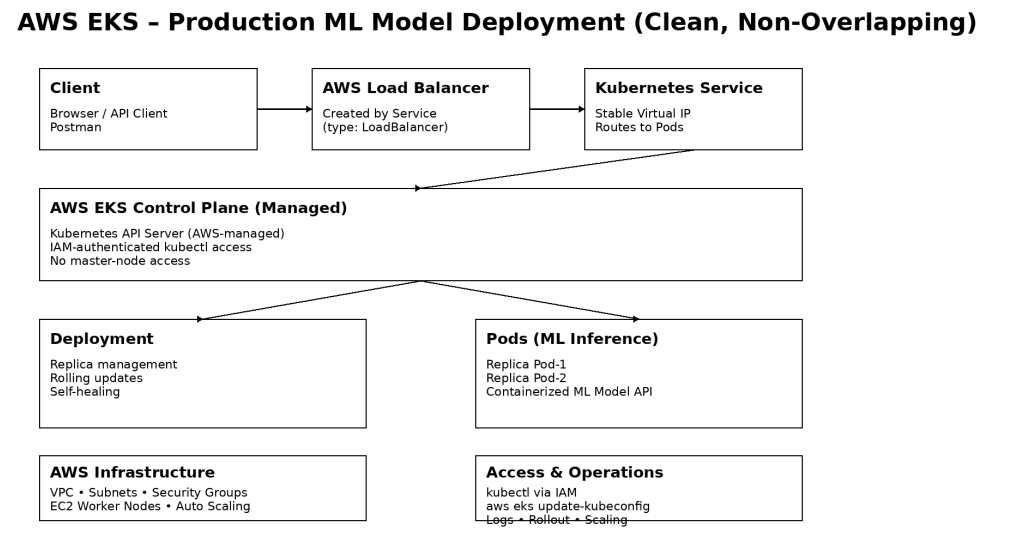
Key Components
- AWS EKS: Managed Kubernetes control plane
- EC2 Worker Nodes: Managed Node Groups
- Kubernetes Deployment: ML inference workload management
- Kubernetes Service: ClusterIP / LoadBalancer for access
- AWS IAM: Authentication & RBAC integration
- Amazon VPC: Networking, subnets, security groups
- Docker: Containerized ML inference image
- Container Registry: Docker Hub / Amazon ECR
Challenges & Outcomes
Technical challenges faced and resolutions
Key Technical Challenges
- Configuring kubectl access to a managed EKS control plane, including proper kubeconfig setup and IAM authentication
- Understanding the separation between managed control plane and worker nodes in AWS EKS compared to local Kubernetes environments
- Exposing the ML inference service securely using AWS-integrated Kubernetes Services without direct access to master nodes
- Ensuring reliable deployment behavior and debugging Pods in a cloud-based Kubernetes environment with stricter networking and security controls
How They Were Resolved
- Kubernetes access issues were resolved by correctly configuring kubeconfig
using
aws eks update-kubeconfig, allowing kubectl to communicate with the EKS API server through IAM-authenticated requests - The EKS architecture was understood and applied by relying on AWS-managed control plane services and focusing operational tasks on worker nodes and Kubernetes abstractions
- Service exposure challenges were addressed using AWS-integrated Kubernetes Service types, enabling controlled external access through managed load balancers
- Deployment and runtime issues were diagnosed using kubectl logs, describe, and rollout commands, ensuring stable model serving and enabling quick recovery through rollbacks
Scalability & Reliability Considerations
The application is deployed using Kubernetes Deployments, enabling horizontal scaling by adjusting replica counts. AWS EKS provides a highly available, managed control plane, while Kubernetes ensures self-healing by automatically replacing failed Pods. Rolling update strategies allow model version upgrades without downtime, and cloud-native networking via AWS Load Balancers ensures reliable external access to the inference service.
Kubernetes Architecture & YAML Mapping
Architecture to YAML construct mapping
| Architecture Block | Kubernetes YAML Construct |
|---|---|
| Client (Browser / Postman) | External consumer (outside cluster) |
| API Entry Point | Service |
| Service Type | spec.type: LoadBalancer |
| Service Port | spec.ports.port: 80 |
| Target Container Port | spec.ports.targetPort: 9696 |
| Traffic Routing | spec.selector |
| Stable Virtual IP | Service abstraction |
| Workload Controller | Deployment |
| Pod Lifecycle Management | Deployment |
| Pod Template | spec.template |
| Pod Labels | spec.template.metadata.labels |
| Selector Matching | spec.selector.matchLabels |
| Container Definition | spec.template.spec.containers |
| Container Image | containers.image |
| Resource Limits | containers.resources.limits |
| Application Port | containers.ports.containerPort |
| Self-Healing | Deployment (ReplicaSet) |
Code Examples & Configuration
Key YAML configurations and commands
LoadBalancer Service YAML
apiVersion: v1
kind: Service
metadata:
  name: recruitment-rank-app
spec:
  type: LoadBalancer
  selector:
    app: recruitment-rank-app
  ports:
    - protocol: "TCP"
      port: 80
      targetPort: 9696
Deployment YAML
apiVersion: apps/v1
kind: Deployment
metadata:
  name: recruitment-rank-app
spec:
  selector:
    matchLabels:
      app: recruitment-rank-app
  template:
    metadata:
      labels:
        app: recruitment-rank-app
    spec:
      containers:
        - name: placement-app
          image: rajesharigala/no-ui-placement-ml-model:v1-arm64
          resources:
            limits:
              memory: "128Mi"
              cpu: "500m"
          ports:
            - containerPort: 9696
Key Commands Used
# Create EKS cluster
eksctl create cluster --name mlops-cluster --version 1.31 --region us-east-1 \
  --zones=us-east-1a,us-east-1b,us-east-1c,us-east-1d \
  --nodegroup-name linux-nodes --node-type t2.medium --nodes 2

# Update kubeconfig
aws eks update-kubeconfig --region us-east-1 --name mlops-cluster

# Apply configurations
kubectl create -f app-deployment.yaml
kubectl create -f loadbalancer.yaml

# Check resources
kubectl get all
kubectl get nodes
kubectl describe pod <pod-name>

# Delete cluster
eksctl delete cluster --name <cluster-name>
Cost Analysis & Optimization
Cost Breakdown for the current EKS Project
EKS Control Plane Cost
- Standard pricing: $0.10 per hour per cluster
- Monthly cost (730 hours): ≈ $73 per month
Worker Nodes (EC2 Instances)
- Instance type: t2.medium (2 vCPU, 4 GiB RAM)
- On-Demand price: $0.0464 per hour per node
- For 2 nodes running 24/7: ≈ $67 – $70 per month
Other Potential Costs
Total Estimated Monthly Cost (24/7 running)
| Component | Monthly Cost (Approx.) |
|---|---|
| EKS Control Plane | $73 |
| 2 × t2.medium EC2 nodes | $67 – $70 |
| Total | $140 – $160 / month |
Cost Optimization Practices Applied & Considered for Production
- Used appropriately sized t2.medium instances during development to keep costs minimal while maintaining sufficient compute for ML inference testing.
- Implemented on-demand cluster creation and deletion (
eksctl delete cluster) after experimentation to avoid unnecessary charges. - Designed the architecture with multi-AZ node groups for high availability while carefully controlling node count.
For Real-time Production Use Cases, the following optimizations are recommended:
- Spot Instances for non-critical workloads to reduce EC2 costs by up to 70%.
- Karpenter or Cluster Autoscaler for intelligent auto-scaling based on actual workload demand.
- Savings Plans or Compute Savings Plans for predictable long-term usage.
- AWS Fargate for serverless compute (eliminates the need to manage EC2 nodes).
- Horizontal Pod Autoscaler (HPA) combined with Vertical Pod Autoscaler (VPA) to optimize resource allocation at the pod level.
- Reserved Instances for stable, long-running workloads.
- Right-sizing of node groups and implementation of node termination handler for graceful Spot Instance handling.
This project demonstrates both practical cost awareness during development and a clear understanding of production-grade cost optimization strategies required for scalable ML/GenAI models serving in enterprise environments.
Assets & References
Code, diagrams, study material
GitHub Repository
Source code repository containing deployment scripts, configurations, and documentation.
Access Repository