Dockerized Node.js Application
Container Execution Layer | Platform Engineering Project
Built, containerized, and executed a Node.js application in a reproducible Docker environment, producing a CI/CD-ready container artifact. This project focuses on containerization as the execution foundation for cloud-native applications.
Project Summary
Comprehensive Project Overview
Project Category
Containerization & Execution Foundation
Industry/Domain
Platform Engineering / Cloud Infrastructure
Cloud-Native Application Containerization (Execution Layer)
Project Focus
DevOps-focused containerization project
Docker-based containerization as execution artifact for CI/CD pipelines
Key Technologies & Concepts
Core Docker & Containerization Technologies
Docker & Containerization Keywords
Problem & Objective
What problem did this project solve?
Problems Solved
- Eliminated environment and runtime dependency inconsistencies across development and deployment machines
- Removed reliance on local Node.js installation by encapsulating the application within a Docker container
Primary Objectives
- Package the Node.js application and its runtime into a single, portable Docker image
- Enable consistent execution of the application across local, CI/CD, and cloud environments
Solution & Architecture
Architectural Overview
Solution Overview
The solution involves creating a Docker container that packages the Node.js application, its runtime, and all dependencies into a single, portable unit that can run consistently across different environments.
Stateless container design enables horizontal scaling when deployed under an orchestrator (e.g., Kubernetes). Containerized runtime ensures consistent and reliable execution across environments.
The Docker image serves as an immutable artifact that can be versioned, stored in a registry, and deployed consistently across development, testing, and production environments.
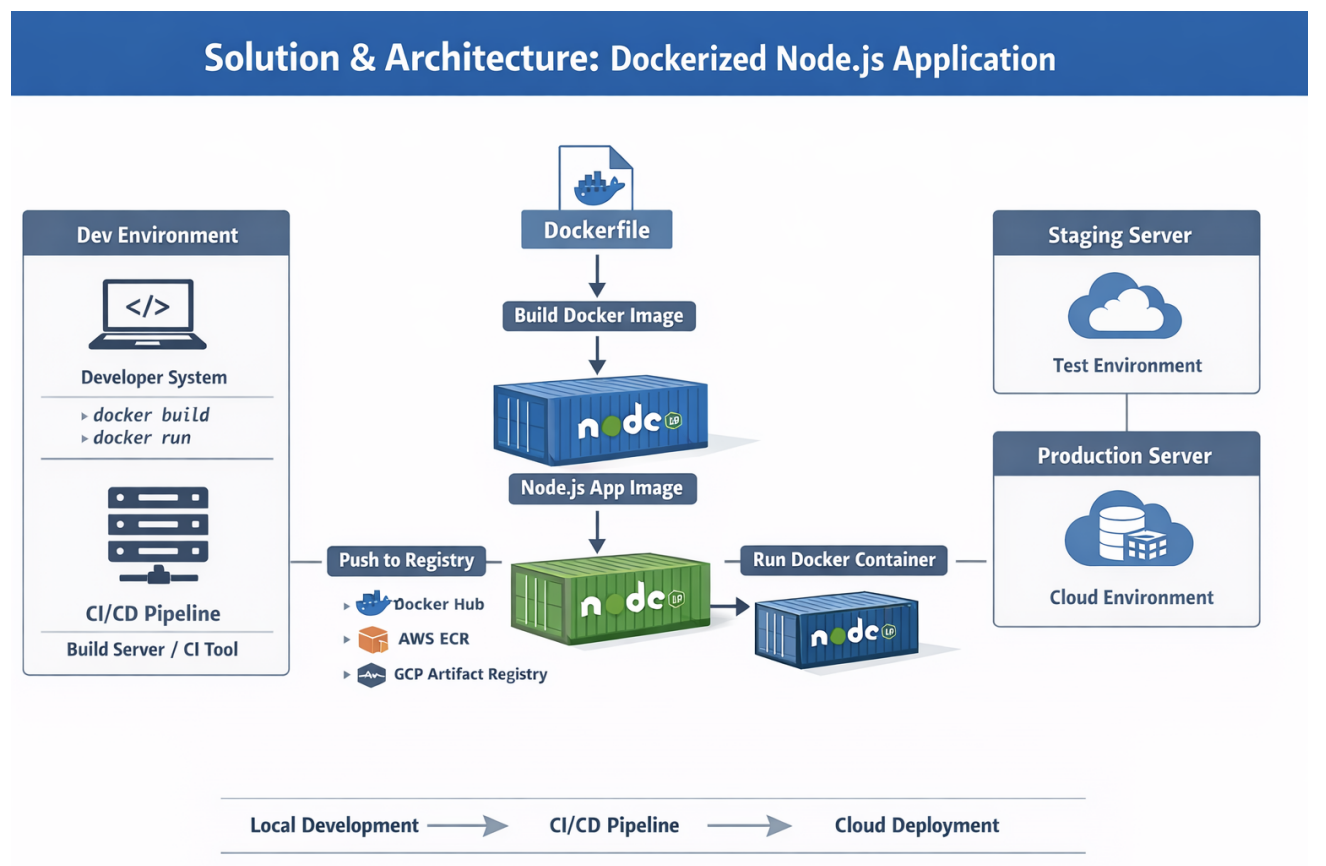
Key Components
- Docker Engine / Docker Desktop
- Dockerfile (Image Blueprint)
- Node.js Application Runtime
- Docker Image & Container
- Container Registry (Docker Hub)
- Cloud Platform: None (local Docker environment; cloud-ready via container registry)
DevOps Details
DevOps Implementation Focus
AI/ML Type or DevOps Focus
- DevOps-focused project
- Docker-based containerization used as the execution artifact for CI/CD pipelines
- No AI/ML components involved
Pipeline & Automation
- No AI/ML models involved
- Implemented Docker-based build, run, tagging, and registry push workflow
- Reusable execution artifact for CI/CD automation
Tools & Monitoring
CI/CD & Containerization Tools:
- Docker Engine / Docker Desktop
- Docker CLI
- Docker Hub (Container Registry)
- Container-ready for CI/CD and orchestration integration
Monitoring & Optimization:
- Container runtime logs accessed via Docker logs and terminal output
- Image versioning and tagging used for traceability and controlled releases
Skills & Technologies Used
Technical Proficiency Demonstrated
Primary Skills
- Docker & Containerization - Intermediate
- Node.js Application Runtime - Intermediate
- Linux Command Line - Intermediate
Secondary Tools / Frameworks
- Docker Desktop
- Docker Hub
- Git / GitHub
- Linux-based OS (macOS / Ubuntu environment)
Programming Languages
- Configuring Dockerfile
- Node.js web app (provided by developer)
Cloud & DevOps Tools
Dockerfile Implementation
Step-by-Step Docker Configuration
Dockerfile Code
FROM node:12
# Set the working directory within the container to /app
WORKDIR /app
# Copy the package*.json files from the host file system to the container at the path /app
COPY package*.json ./
# Run the npm install command to install the required dependencies
RUN npm install
# Copy all files from the host file system to the container at the path /app
COPY . .
# Set the environment variable PORT to 8080
ENV PORT=8080
# Expose port 8080 to allow incoming connections
EXPOSE 8080
# Specify the command to run when the container starts up
CMD ["npm", "start"]
Difference between CMD and ENTRYPOINT: At runtime, CMD can be overridden if necessary but not ENTRYPOINT. For this project, CMD is used to specify the default command to run the application.
Architecture & Dockerfile Mapping
| Architecture Component | Dockerfile Instruction | Purpose |
|---|---|---|
| Base Runtime Environment | FROM node:12 | Defines Node.js runtime inside the container |
| Application Workspace | WORKDIR /app | Sets isolated working directory for the app |
| Dependency Definition | COPY package*.json | Copies dependency metadata into image |
| Dependency Installation | RUN npm install | Installs Node.js dependencies inside container |
| Source Code Packaging | COPY . . | Copies application code into the image |
| Runtime Configuration | ENV, EXPOSE | Configures environment variables and network access |
| Application Startup | CMD ["npm", "start"] | Starts the Node.js application at container runtime |
Docker Commands Reference
Essential Docker CLI Commands
| Docker CLI Command | Explanation |
|---|---|
| docker version | Displays Docker client, server, and engine version details |
| docker images | Lists all Docker images available locally |
| docker build -t <image-name>:<tag> | Builds a Docker image from the Dockerfile in the current directory |
| docker pull <image-name>:<tag> | Pulls an image from a container registry |
| docker run -it -p <host-port>:<container-port> <image>:<tag> | Creates and runs a container interactively with port mapping |
| docker run -d -p <host-port>:<container-port> <image>:<tag> | Runs a container in detached mode |
| docker ps | Lists currently running containers |
| docker ps -a | Lists all containers (running and stopped) |
| docker stop <container-id> | Stops a running container |
| docker start <container-id> | Starts a stopped container |
| docker logs <container-id> | Fetches logs from a container |
| docker exec -it <container-id> /bin/bash | Opens an interactive shell inside a running container |
| docker tag <source>:<tag> <repo>/<image>:<tag> | Retags an image for registry compatibility |
| docker login | Authenticates with Docker Hub or another registry |
| docker push <repo>/<image>:<tag> | Pushes a Docker image to a container registry |
Challenges & Outcomes
Technical Challenges and Solutions
Key Technical Challenges
- Resolving environment and runtime dependency issues between host system and container
- Correctly configuring port mapping and container networking for external access
How They Were Resolved
- Encapsulated the complete Node.js runtime and dependencies within the Docker image using a well-defined Dockerfile
- Validated port exposure and host-to-container port mapping through iterative container runs and testing
Production-Grade Implementation
- Docker File: Blueprint for building a docker images
- Docker Image: Packed software; Template for running a docker containers
- Container: Runtime environment where we run our applications
Assets & References
Code, diagrams, study material
GitHub Repository
Source code repository containing the Dockerized Node.js application and Docker configuration files.
Access Repository