GitHub Actions CI/CD Pipeline
Pipeline as Code (YAML) | Platform Engineering Project
Building CI/CD pipelines with the concept/technique of Pipeline as Code (PaC) by building .yaml Key-Value Pair script and Automating the software delivery by building the software and conducting tests if necessary through GitHub Actions. Build and deliver a Node.js application to GitHub Pages.
Project Summary
Comprehensive Project Overview
Project Category
GitHub + GitHub Actions (CI/CD) → GitHub Pages
Industry/Domain
Git Repo + GitHub Actions + GitHub Pages
DevOps Focus
DevOps Focus with Automation
Key Technologies & Concepts
Core Technologies Used
GitHub Actions CI/CD Keywords
Problem & Objective
What problem did this project solve?
Problems Solved
- Automated Deployment of a software product like App or website through automatic pull request and trigger, at a speed
- Safe roll-back option whenever necessary
Primary Objectives
- Creating a robust Infrastructure through Pipeline as Code (PAC) Technique
- Build a Working Model - Use GitHub Actions for CI/CD Pipelines by Using YAML based pipeline Structure - Use GitHub Pages to store and deploy the artifacts
Solution & Architecture
Architectural Overview
Solution Overview
Using GitHub repo as the source for the code and then using the YAML script to build the CI/CD Pipeline with multiple stages for building and deploying the application on GitHub Pages.
GitHub Pages was chosen to demonstrate CI/CD principles independent of backend complexity, keeping focus on pipeline design and deployment strategy rather than application logic.
GitHub Actions provides an ability to build custom workflows/pipelines where we can build, test and deploy the application to any third party cloud like AWS, Azure, GCP. Here we are deploying the application to GitHub Pages.
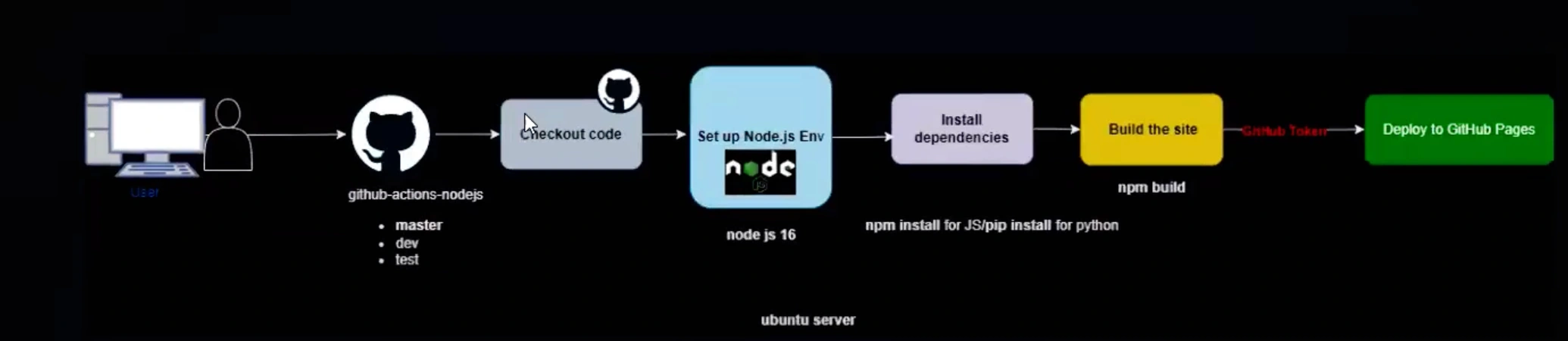
Key Components
- GitHub Account → GitHub Repository → GitHub Actions → GitHub Pages
- Services Used: Runners, Managed Actions
- Cloud Platform used: None (GitHub ecosystem only)
Skills & Technologies Used
Technical Proficiency Demonstrated
Primary Skills
- PipeLine As Code (Pac): YAML configuration based on GitHub Actions Official documentation
- Skill in using the Git tools - GitHub repos, GitHub Actions, GitHub Pages
- Pipeline building process
Secondary Tools / Frameworks
- GitHub Secrets usage skill
- GitHub CLI Commands
Programming Languages
- YAML pipeline configuration file
- Node.js (provided by developer)
GitHub DevOps Tools
Pipeline Execution & Governance
How the pipeline works and is controlled
Pipeline Execution
- CI/CD pipelines run automatically upon changes in the code (on:push:branches:master)
- Orchestration: steps → uses/runs
- Logging - View Raw Logs
Governance & Controls
Governance / Controls for GitHub Actions:
- By using the YAML script → On → Push → Branches → master/dev/test
- Production deployments are governed through branch protection rules and pull-request reviews, serving as approval gates in the GitHub Actions workflow
Technical Challenges & Resolutions
Key Technical Challenge
- Challenge: How to run Automated pipeline
Resolution
- Resolution: Implemented through YAML configuration with event triggers and branch-based execution
Azure DevOps CI/CD - Architecture & YAML Mapping
Architecture to YAML construct mapping
| Architecture Block | YAML Construct |
|---|---|
| User / Developer | on: (event trigger source) |
| GitHub Repository | on: push, on: pull_request, branches |
| Branches (master / dev / test) | branches: filter under push / pull_request |
| GitHub Actions Workflow | .github/workflows/**.yml |
| Checkout Code | uses: actions/checkout@v4 |
| Ubuntu Runner / Server | runs-on: ubuntu-latest |
| Set up Node.js Environment | uses: actions/setup-node@v4 |
| Node.js Version (v16) | with: node-version: 16 |
| Install Dependencies | run: npm install |
| Build Application | run: npm run build |
| GitHub Token (Auth) | ${[ secrets.GITHUB_TOKEN ]} |
| Deploy to GitHub Pages | uses: peaceris/actions-gh-pages@v3 (or equivalent deploy action) |
| CI Pipeline Execution | jobs: |
| Sequential Steps | steps: |
| Job Orchestration | Single job or multiple jobs with needs: |
| Environment Isolation | Separate workflows or branch-based logic |
Pipeline Execution Evidence
Proof of successful implementation
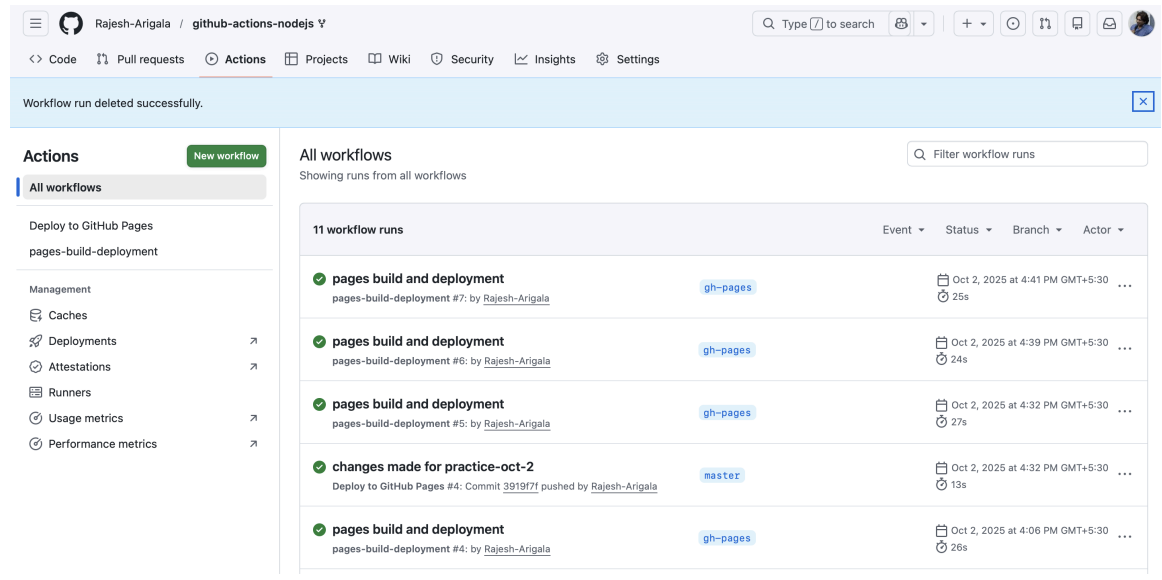
Pipeline Run History
CI + Manual execution history demonstrating successful pipeline runs.
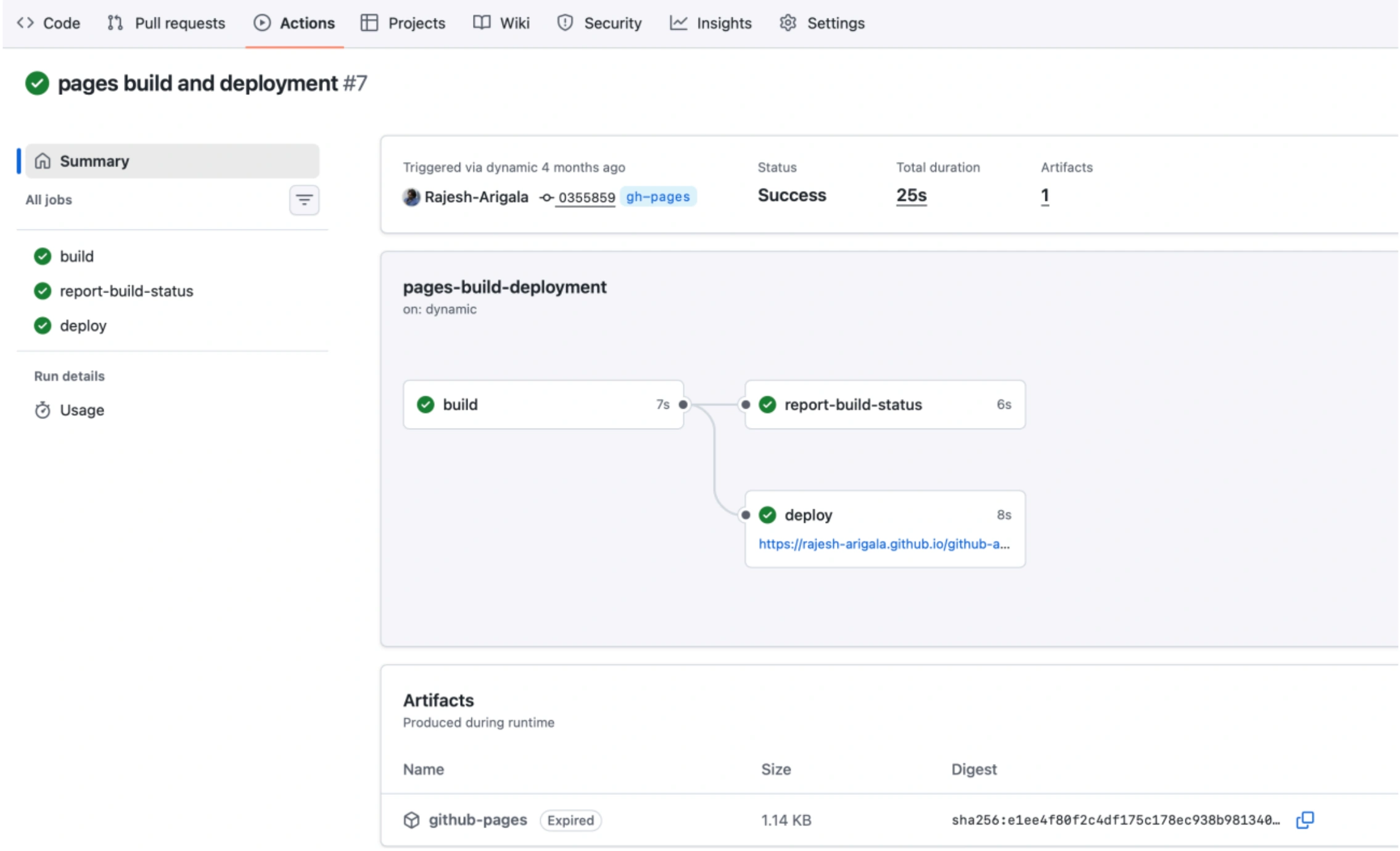
Multi-stage Execution
Evidence of multi-stage pipeline execution with different jobs and steps.
Project execution link (proof)
Live link to the deployed Node.js application on GitHub Pages.
Assets & References
Code, diagrams, study material
GitHub Repository
Source code repository containing the Node.js application and GitHub Actions workflows.
Access Repository