Google Cloud Build CI/CD Pipeline
Pipeline as Code (YAML) | Cloud Platform Engineering Project
Deployment of a Dockerized Machine Learning Model through CI/CD pipelines using Google Cloud Build, Artifact Registry, and Cloud Run. Building CI/CD pipelines with the concept/technique of Pipeline as Code (PaC) by building .yaml Key-Value Pair scripts.
Project Summary
Comprehensive Project Overview
Project Category
Google Cloud Platform + Google Cloud Build + Artifact Registry + Cloud Run → CI/CD on Cloud
Industry/Domain
Cloud-Native CI/CD & MLOps Platform Engineering
DevOps Focus
MLOps with DevOps Focus with Automation
Key Technologies & Concepts
Core Technologies Used
GCP CI/CD - Keywords
Problem & Objective
What problem did this project solve?
Problems Solved
- Deployment of a Dockerized Machine Learning Model through automatic pull request via Docker Hub and trigger, at a speed
- Safe roll-back option whenever necessary
- Manual Approval Intervention simulating the real world scenarios
Primary Objectives
- Creating a robust Infrastructure through Pipeline as Code (PAC) Technique
- Build a Working Model - Use Google Cloud Build for CI/CD Pipelines by Using YAML based pipeline Structure
Solution & Architecture
Architectural Overview
Solution Overview
Using GitHub as the source for the code and then using the YAML script to build the CI/CD Pipeline with multiple stages for build, tag, register, approve and deploy multiple versioned models of the application on Google Cloud Run, a serverless container service which runs on Kubernetes Infrastructure. Effectively it is scalable and highly available along with logging and monitoring. There is a manual approval process to have a human intervention, which is an industry grade practice.
Cloud Run was chosen to demonstrate CI/CD principles independent of backend complexity, keeping focus on pipeline design, approvals, and deployment strategy rather than application logic.
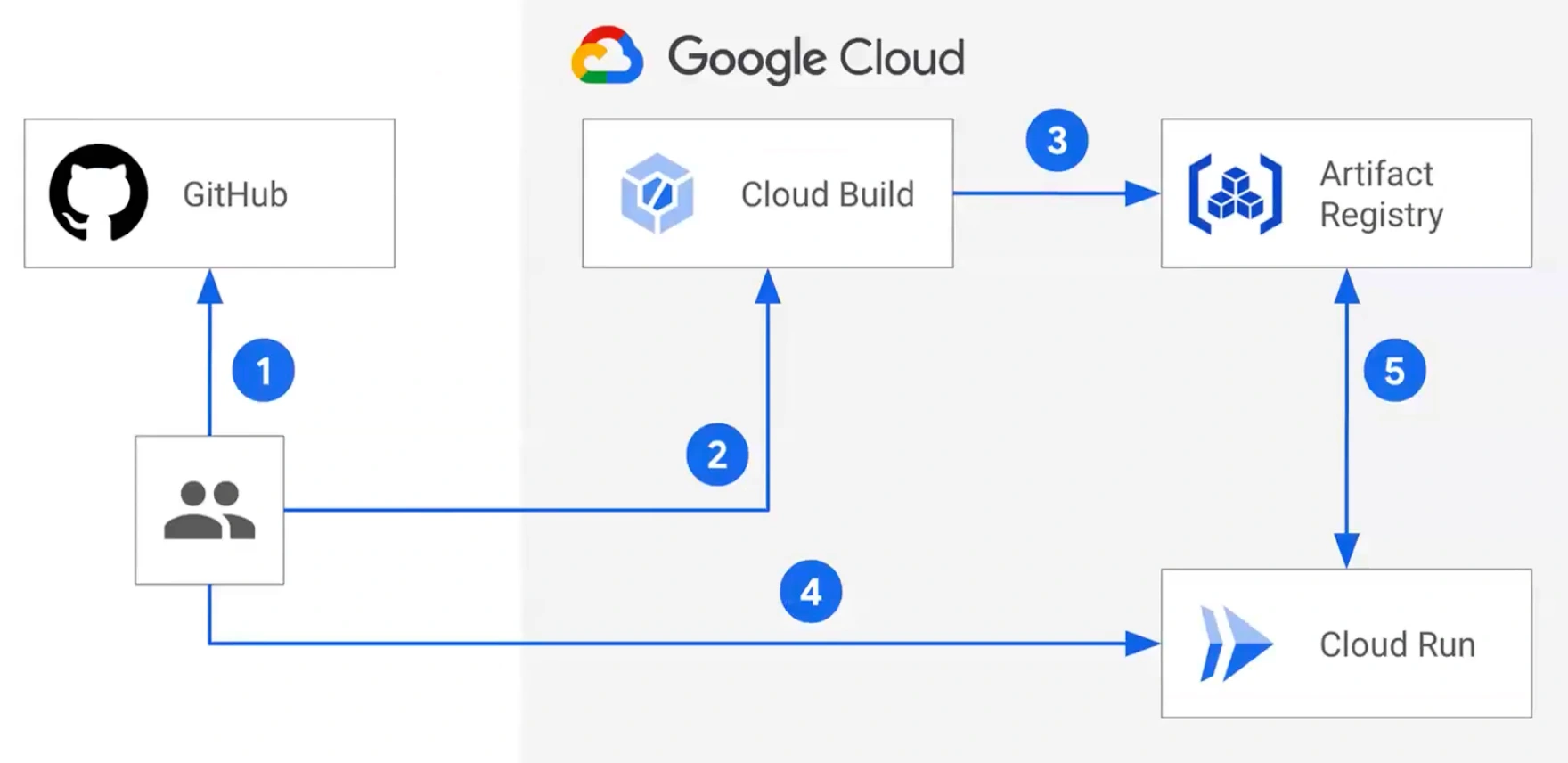
Key Components
- Subscriptions/Google account → Projects (Resource Groups) → Resources/Services
- Services Used: Virtual machines, cloud build, cloud run, artifact registry, managed actions
- Cloud Platform used: Google Cloud
Scalability & Reliability: Reliable is decided by metrics like Pipeline pass-rate, Test Pass rate, Pipeline duration etc. Scalability is possible because of the cloud run capabilities.
Skills & Technologies Used
Technical Proficiency Demonstrated
Primary Skills
- PipeLine As Code (Pac): cloudbuild.yaml configuration based on Google Cloud Official documentation
- Skill in using the cloud tools - projects, services
- Pipeline building process
- GitHub usage
Secondary Tools / Frameworks
- Docker Hub usage skill → docker pull, docker push
Programming Languages & Tools
- cloudbuild.yaml pipeline configuration file
- gcloud CLI commands
- GitHub CLI Commands
- Python language
Cloud & DevOps Tools
Pipeline Execution & Governance
How the pipeline works and is controlled
Pipeline Execution
- CI/CD pipelines run automatically upon changes in the code (pr, trigger)
- Orchestration: cloudbuild.yaml, timeout
- Logging - View Raw Logs
- Manual Approval gates
Governance & Controls
- Secure CI/CD authentication
- Production deployment governance
- Rollback via Cloud Run revisions
- Cloud Build logs and audit trail
- CI/CD for containerized ML services
Technical Challenges & Resolutions
Key Technical Challenges
- Challenge 1: How to give both Manual Approval and Automated Approval at the same time?
- Challenge 2: How to create a pipeline and wait to run it later?
Resolutions
- Resolution 1: Manual approval gates were implemented using approve option during the build process. A timeout safeguard was configured to handle non-responsive approvals and simulate real-world escalation or rollback scenarios.
- Resolution 2: Instead of running the pipeline just look out for save option and then trigger the pipeline through code changes at the code level.
Azure DevOps CI/CD - Architecture & YAML Mapping
Architecture to YAML construct mapping
| Architecture Block | YAML Construct (GCP / Cloud Build) |
|---|---|
| GitHub / Cloud Source Repo | trigger: (GitHub / CSR trigger) |
| Cloud Build Pipeline | cloudbuild.yaml (pipeline root) |
| Linux Runner | Cloud Build worker (steps: on Google-managed Linux) |
| Build Stage | steps: (build step definitions) |
| Manual Approval | Cloud Build Approvals (approvalConfig:) |
| Dev / Staging | substitutions: / separate trigger or project |
| Prod | Separate trigger or gated approval pipeline |
| Artifact Storage | Artifact Registry / Cloud Storage |
| Deployment Target | gcloud run deploy / kubectl apply |
| Environment Identity | Service Account (IAM-based) |
| Logging & Execution | Cloud Build Logs |
Pipeline Execution Evidence
Proof of successful implementation
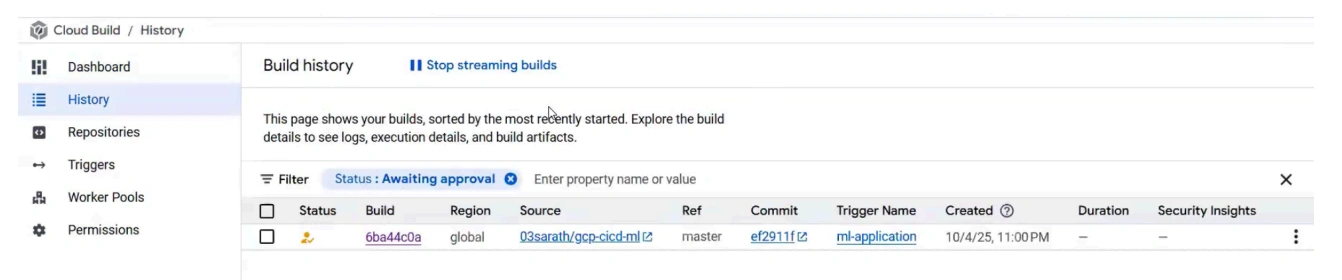
Pipeline Run History
CI + Manual execution history demonstrating successful pipeline runs.
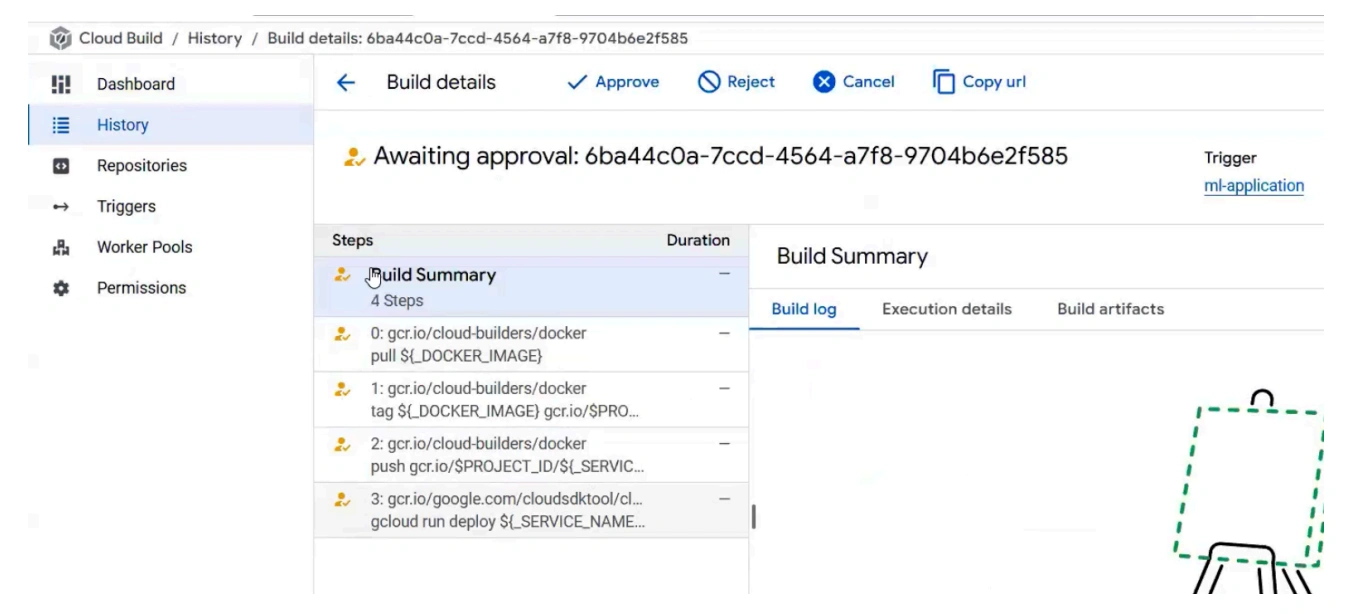
Multi-stage Execution with Manual Approvals
Evidence of multi-stage pipeline execution with manual approval gates.
ML Application Deployed
The Dockerized Machine Learning Model successfully deployed via the CI/CD pipeline:
Placement Prediction System
Application deployed on Cloud Run with auto-scaling capabilities based on Kubernetes infrastructure.
Assets & References
Code, diagrams, study material
GitHub Repository
Source code repository containing the Dockerized ML application and Cloud Build configurations.
Access Repository