Azure DevOps CI/CD Pipeline as Code
Cloud Platform Engineering Project - Deployment of a Static Web App
This project demonstrates the implementation of production-grade CI/CD pipelines using Pipeline as Code (PAC) methodology with Azure DevOps and YAML configurations. The solution showcases automated deployment of a static web application with manual approval gates, environment separation, and rollback strategies - simulating real-world enterprise deployment scenarios.
Project Summary
Complete Project Overview
Project Details
Category: Azure Cloud + Azure DevOps → CI/CD on Cloud
Industry: Cloud Computing + DevOps (Platform Engineering)
Focus: Building CI/CD pipelines with Pipeline as Code technique using YAML
Primary Objective
- Creating robust infrastructure through Pipeline as Code (PAC)
- Building a working model using Azure DevOps CI/CD pipelines
- YAML-based pipeline structure implementation
Key Technologies
Problem & Solution
Addressing Real-World Deployment Challenges
Problems Solved
- Deployment of software products through automatic pull requests and triggers
- Safe rollback option whenever necessary
- Manual approval intervention simulating real-world scenarios
- Environment separation (Staging vs Production)
Solution Approach
- Azure Repos/GitHub as source code repository
- YAML scripts for building CI/CD pipelines
- Multiple stages: Build, Approve, Deploy
- Azure Static Web App for deployment target
- Manual approval process for human intervention
Azure Static Web App was chosen to demonstrate CI/CD principles independent of backend complexity, keeping focus on pipeline design, approvals, and deployment strategy rather than application logic.
System Architecture
Production-Grade CI/CD Infrastructure
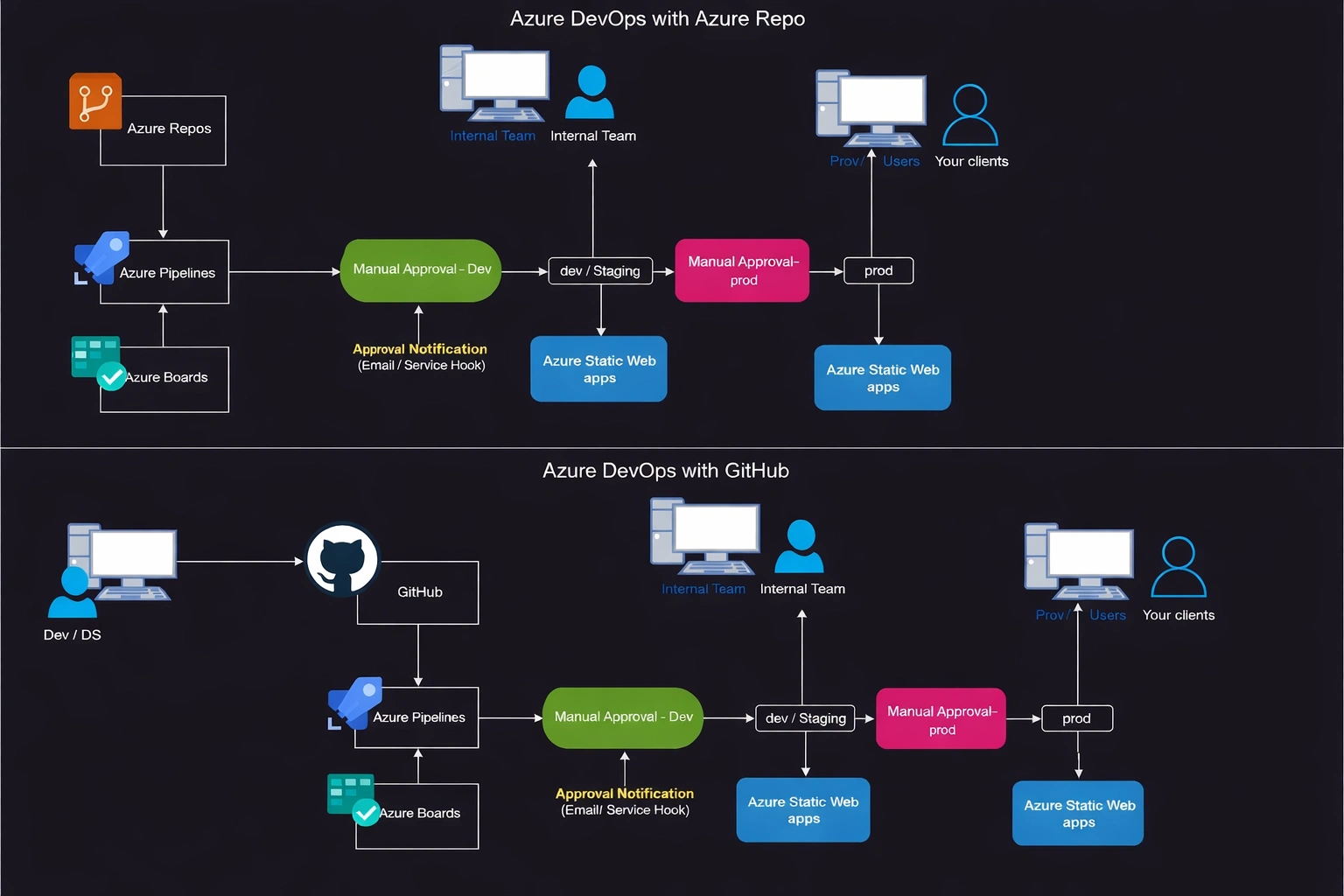
Cloud Platform & Services
Azure Cloud
- Subscriptions Management
- Resource Groups Organization
- Static Web App Service
- Virtual Machines (Runners)
Azure DevOps
- Repos (Source Control)
- Pipelines (CI/CD)
- Boards (Task Management)
- Environments (Approvals)
Pipeline Stages & Flow
Multi-Stage CI/CD Implementation
Code Repository & Triggers
- Azure Repos or GitHub as source code repository
- Git-based triggers (PR triggers, branch triggers)
- Automatic pipeline execution on code changes
- Manual trigger capability for controlled deployments
Build Stage
- Linux runners (ubuntu-latest) for build environment
- Dependency installation and code compilation
- Automated testing execution
- Artifact generation for deployment
stages:
- stage: Build
  displayName: 'Build stage'
  jobs:
  - job: Build
    pool:
      vmImage: 'ubuntu-latest'
    steps:
    - task: NodeTool@0
      inputs:
        versionSpec: '16.x'
    - script: |
        npm install
        npm run build
Manual Approval Gates
- Manual approvals using Azure DevOps Environments
- Timeout configuration for escalation scenarios
- Role-based approval permissions
- Email notifications for pending approvals
Deployment Stages
Staging Deployment
- Automated deployment to staging environment
- Smoke testing and validation
- Performance and security checks
Production Deployment
- Final approval required for production
- Blue-green deployment strategy
- Rollback capability on failure
Skills & Technologies
Technical Stack & Proficiency
| Category | Technologies | Proficiency Level |
|---|---|---|
| Primary Skills | Pipeline as Code (YAML), Azure DevOps, Resource Management | Advanced |
| Cloud Platform | Azure Cloud, Subscriptions, Resource Groups, Static Web App | Advanced |
| DevOps Tools | Azure DevOps (Repos, Pipelines, Boards), GitHub, Linux Runners | Advanced |
| Programming | YAML, Node.js, Vue.js, GitHub CLI | Intermediate+ |
| Concepts | CI/CD, Multi-stage Pipelines, Manual Approvals, Rollback Strategies | Expert |
Azure DevOps Components
Pipeline Features
8. Azure DevOps CI/CD – Architecture & YAML Mapping
Mapping architectural concepts to pipeline code
| Architecture Block | YAML Construct |
|---|---|
| Azure Repos / GitHub | Trigger / pr |
| Azure Pipelines | Pipeline root, Stages |
| Linux Runner | pool: vmImage |
| Build Stage | stage → job → steps |
| Manual Approval | Environment Approvals |
| Dev / Staging | Environment: dev |
| Prod | Environment: prod |
| Azure Static Web App | AzureStaticWebApp@0 task |
Challenges & Outcomes
Technical Problem Solving
Key Challenges
- Implementing both manual and automated approval gates
- Creating pipeline that waits for manual trigger
- Environment separation with proper access control
- Rollback strategy implementation
Solutions Implemented
- Azure DevOps Environments for manual approvals
- timeoutInMinutes for escalation handling
- Git triggers for automated pipeline execution
- Version-controlled deployment with rollback capability
Manual approval gates were implemented using Azure DevOps Environments with timeoutInMinutes safeguards to handle non-responsive approvals and simulate real-world escalation or rollback scenarios.
Reliability & Scalability
- Pipeline pass-rate monitoring and optimization
- Test pass rate validation and reporting
- Pipeline duration optimization
- Resource utilization and cost optimization
Architecture Patterns
Pipeline Design Approaches
Simple Pattern
Build → Deploy
- Direct deployment after build
- No approval gates
- Suitable for development environments
Simple Stages
Build → Manual Approval → Deploy
- Single approval gate
- Basic quality control
- Suitable for small teams
Advanced Stages
Build → Stage Approval → Testing → Prod Approval → Deploy
- Multiple approval gates
- Staging environment testing
- Production deployment control
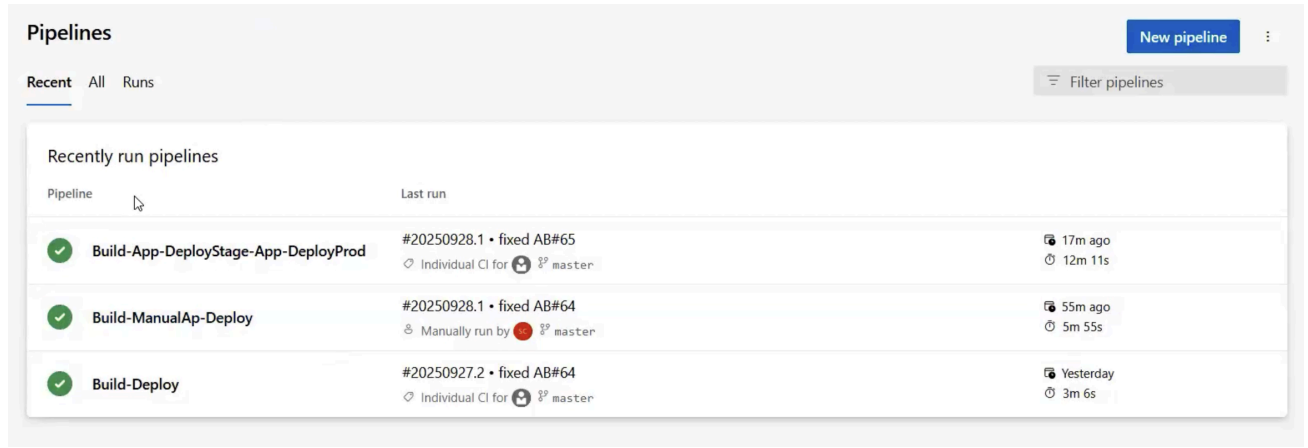
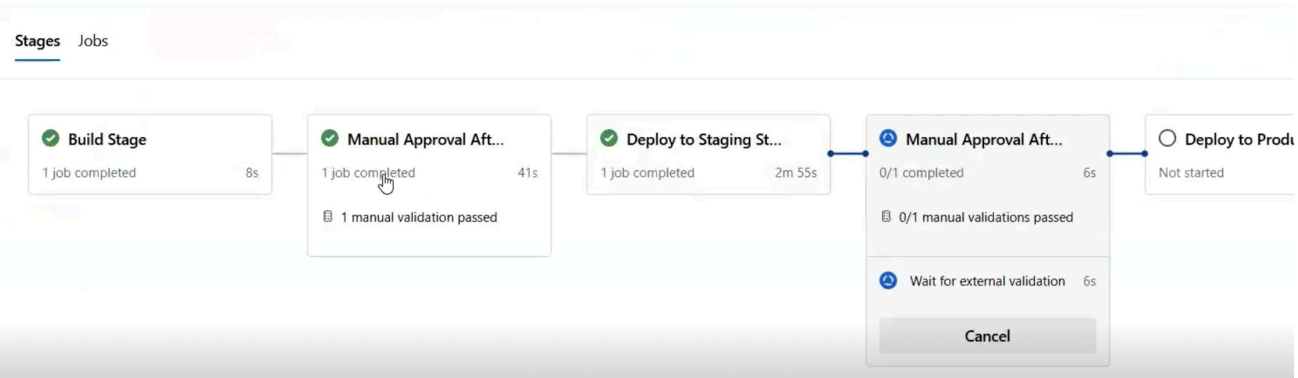
Pipeline Execution Evidence
Real-world pipeline runs and deployment proof
1. Pipeline Run History (CI + Manual)
2. Multi-stage Execution with Manual Approvals
3. Project Execution Link (Proof)
Live links to the deployed static web applications.
Assets & References
Code, diagrams, study material
GitHub Repository
Complete source code with YAML pipeline configurations, infrastructure scripts, and deployment artifacts.
Access RepositoryStudy Material Resources
Access detailed study materials including YAML configurations and Azure DevOps best practices
Request Study Material