AWS DevOps CI/CD Pipeline
AWS CodePipeline via UI Console | Cloud Platform Engineering Project
Building CI/CD pipelines using CodePipeline tool by building infrastructure via UI console and orchestrating the CodeBuild through buildspec.yaml Key-Value Pair script along with creating a simple bucket policy
This project prioritizes operational correctness and real-world AWS workflows over abstraction.
Project Summary
Comprehensive Project Overview
Project Category
AWS Cloud + AWS DevOps → CI/CD on Cloud
Industry/Domain
Cloud Computing + DevOps (Platform Engineering)
DevOps Focus
DevOps Focus with Automation
Problem & Objective
What problem did this project solve?
Problems Solved
- Deployment of a software product like App or website through automatic pull request and trigger, at a speed
- Safe roll-back option whenever necessary
- Manual Approval Intervention simulating the real world scenarios
Primary Objectives
- Creating a robust Infrastructure through CodePipeline Tool UI console
- Build a Working Model - Use AWS DevOps for CI/CD Pipelines Structure
Solution & Architecture
Architectural Overview
Solution Overview
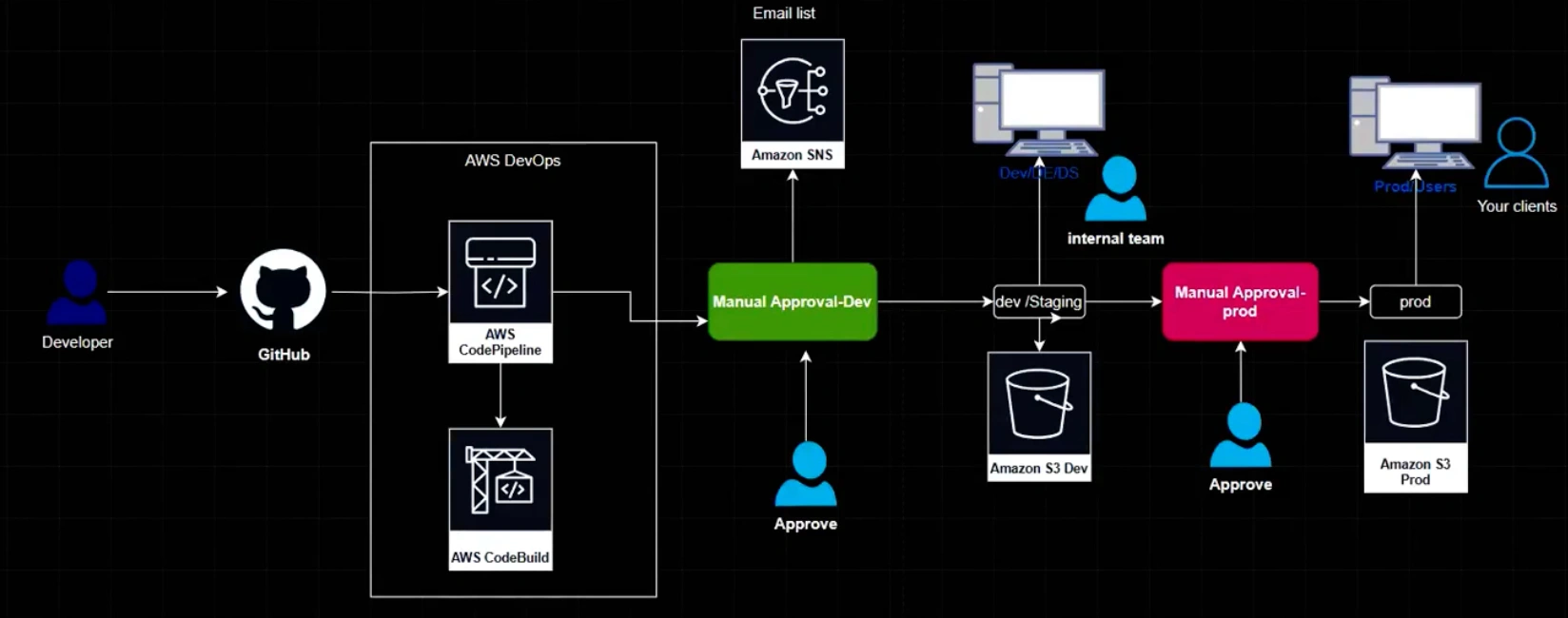
Using GitHub as the source for the code and then using the buildspec.yaml script to build the CI and then use CodePipeline as a CD tool with multiple stages for build, staging approve and prod approve and then final deployment of the application on AWS S3. There is a manual approval process to have a human intervention, which is an industry grade practice.
AWS S3 by creating a stage and prod folders was chosen to demonstrate CI/CD principles independent of backend complexity, keeping focus on pipeline design, approvals, and deployment strategy rather than application logic.
Environment separation is implemented logically via pipeline stages and deployment targets (S3 stage/prod paths), mirroring environment constructs used in Azure and GCP.
Key Components
- Cloud Platform used: AWS
- Services Used: AWS CodePipeline, AWS CodeBuild, AWS S3, AWS SNS, CloudWatch
- Stages: Build-StageApproval-Staging/Testing-ProdApproval-Deploy
Skills & Technologies Used
Technical Proficiency Demonstrated
Primary Skills
- Creating CI and CD via AWS UI console
- Skill in using the cloud tools - Resources
- Pipeline building process
- GitHub usage
Secondary Tools / Frameworks
- Amazon S3 bucket; creation of bucket policy for web access to the world
- AWS SNS - Simple Notification Service
Programming Languages & Tools
- buildspec.yaml codebuild configuration file
- Node.js web app (provided by developer)
- GitHub CLI Commands
Cloud & DevOps Tools
Pipeline Execution & Governance
How the pipeline works and is controlled
Pipeline Execution
- Pipelines - run manually / run automated upon changes in the code (grep command)
- Orchestration: code push and grep, timeout, queued timeout
- Logging - CloudWatch
- Manual Approval stages
Governance & Controls
- Manual approval stages implemented using AWS DevOps pipeline stages
- Timeout and queued timeout safeguard configured to handle code build and nonresponsive approvals
- Roll backs possible at every stage of the pipeline making it autonomous
Technical Challenges & Resolutions
Key Technical Challenges
- Challenge 1: How to give both Manual Approval and Automated Approval at the same time
- Challenge 2: How to create a pipeline and rollback at multiple stages
Resolutions
- Resolution 1: Manual approval stages were implemented using AWS DevOps pipeline stages
- Resolution 2: A timeout and queued timeout safeguard was configured to handle code build and nonresponsive approvals and simulate real-world escalation or rollback scenarios. Roll backs are possible at every stage of the pipeline making it autonomous.
AWS DevOps CI/CD - Architecture & YAML Mapping
Architecture to AWS construct mapping
| Architecture Block | AWS CI/CD Construct |
|---|---|
| CodeCommit / GitHub | Source action (CodePipeline) / GitHub webhook |
| AWS CodePipeline | Pipeline root, Stages |
| Linux Runner | CodeBuild environment (environment: type: LINUX_CONTAINER) |
| Build Stage | CodeBuild project (buildspec.yml → phases) |
| Manual Approval | Manual approval action (CodePipeline) |
| Dev / Staging | Pipeline stage (Dev / Staging) |
| Production | Pipeline stage (Production) with separate S3 paths |
| Artifact Storage | Amazon S3 bucket for artifacts |
| Deployment Target | S3 bucket with stage/prod folders |
| Environment Identity | IAM roles & policies |
| Logging & Monitoring | CloudWatch logs |
Pipeline Execution Evidence
Proof of successful implementation
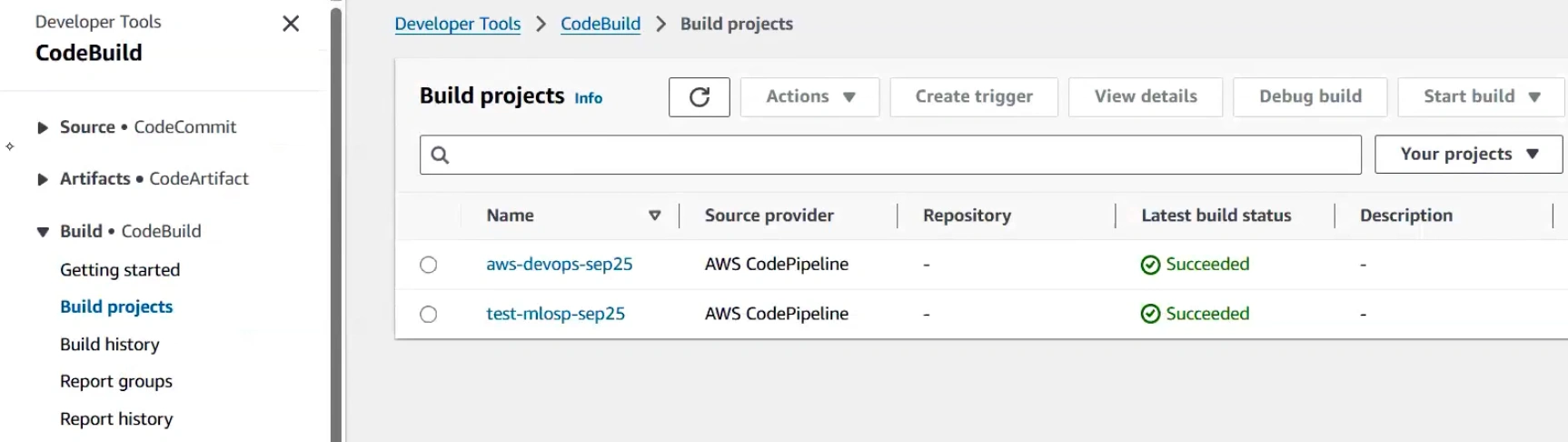
Code Build Execution
CodeBuild project execution with buildspec.yaml configuration.
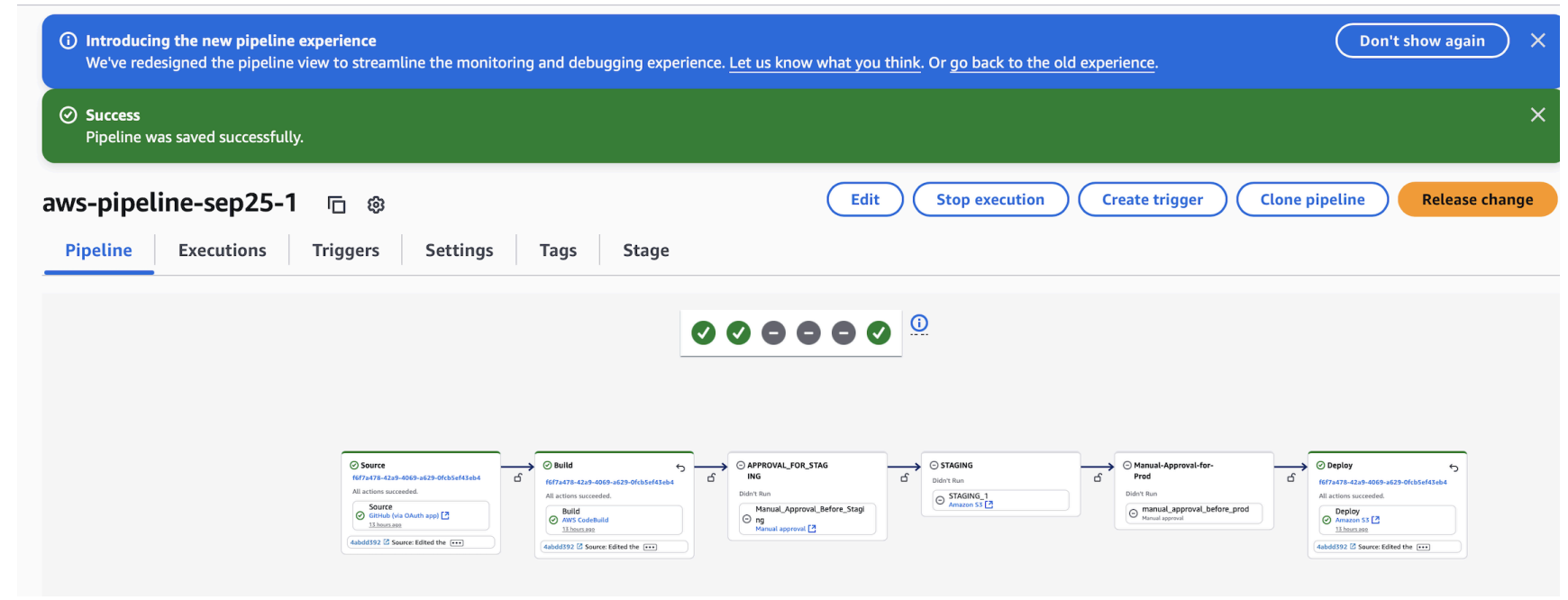
Code Pipeline Stages
Multi-stage pipeline execution with manual approvals and deployment stages.
Rollback Capabilities
Rollback functionality demonstrated at multiple pipeline stages:
- Roll Back: Deploy stage
- Roll Back: Staging stage
- GIT CODE CHANGES: Via commit hash
Assets & References
Code, diagrams, study material
AWS Console Configuration
This AWS CI/CD implementation intentionally demonstrates console-level configuration to reflect real-world AWS DevOps workflows, where pipeline orchestration, approvals, IAM, and deployment strategies are commonly managed through the AWS Console.
- AWS DevOps + AWS Cloud (Project Links included- github)
- a. Pipelines - Using Console UI to create PIPELINES and resources - with GitHub as a single source of truth
- S3 bucket creation: name → ACL disabled → unblock all public access → Default encryption (SSE-S3-AES 256) → create
- S3 Permissions: bucket policy with version → root → label → action → scope of action → users → arm format with bucket name/*
- S3 Properties: static website hosting → enable → Index.html (default) → error.html(error page) → save → static web hosting endpoint
- CodePipeline(3 steps) → build custom pipeline (7 steps)
- Steps 1&2: name → execution mode(Queued) → service role → role name → artefact store (custom) → bucket → encryption key(default) → next
- Step:3 Add Source Stage: Source provider → GitHub(via OAuth app) → Repo → Branch → next
- Step:4 Add Build Stage → Other Build Providers → AWS CodeBuild → project name → proj type → ENVIRONMENT → on demand and Managed_Image(server) → provisioning model (on-demand) → compute(EC2) → running_mode(container) → OS(Amazon Linux) → Runtime → Image(latest) → Image_version(latest) → service_role → role_name → Auto-retry limit → timeout → Queued timeout → certificate(none) → VPC → compute(capacity) → env-variables → parameters → BuildSpec → use buildspec file CI TOOL config file (.yaml) Buildspec(use buildspec file) → buildspec name(buildspec.yml) → logs → cloud watch → group name → next Other build providers → create project → (CodeBuild) → Project name → Build type → Region → Artifacts (source) → next
- Step:5 ; Add Test stage → next
- Step:6 ; Add Deploy Stage → AWS S3 → Region → Input artifacts → Bucket → deploy path → extract file (zip file) → auto roll back on failure → next
- Step:7; Review → create Pipeline
- Copy endpoint and use it to open the app: http://aws-devops-sep25-test.s3-website-us-east-1.amazonaws.com/prod1
GitHub Repository
Source code repository containing the Node.js web application and AWS configuration files.
Access Repository